- Home Page /
- Electronics /
- Computer Accessories /
- Computer Accessories & Peripherals /
- Computer Hard Drive Accessories /
- Docking Stations /
- USB 3.0 to SATA Hard Drive Dock + Dual Bay HD...
0 ratings

Item #:
139590535
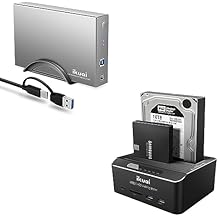
USB 3.0 to SATA Hard Drive Dock + Dual Bay HDD Docking Station, UASP Supported
Item #:
139590535
HKD 472
Price Details
Excluding Shipping & Custom charges ( Shipping and custom charges will be calculated on checkout )
*All items will import from US
0 ratings
Write a review
In stock
 Imported from USA store
QTY:
Order now and get it around Wednesday, June 24
Secured transaction
Ubuy works hard to protect your security and privacy. Our advanced payment security system ensures confidentiality by encrypting your information during transmission using AES (Advanced Encryption Standards) and SSL (Secure Socket Layer) protocols. Your payment details are 100% secure as we do not share your payment details with third party sellers.
Our Top Logistics Partners


The perfect hard drive backup and storage solution for home and office.

Fast
Shipping

Free
Return*

Secure Packaging

100% Original Products

PCI DSS Compliance

ISO 27001 Certified


Note: Step Down Voltage Transformer required for using electronics products of US store (110-120). Recommended power converters Buy Now.


What Stands Out
Dual Bay Support
Simultaneously connects two SATA hard drives, maximizing storage capacity and performance for easy data transfer and backup solutions.
UASP Technology
Enhances data transfer speeds up to 70% faster than traditional USB, significantly reducing wait times when accessing large files.
Easy Setup
Plug-and-play design allows for quick and effortless connection without the need for additional drivers, making it user-friendly for everyone.
Product Details
| Item Weight | 2.5 lbs (1.13 kg) |
Who Should Buy?

-
Data Backup Users
Ideal for users needing quick and efficient backup solutions for multiple hard drives with USB 3.0 support.
-
Tech Enthusiasts
Perfect for hobbyists who experiment with various drives and need a reliable way to access and manage data.
-
IT Professionals
Beneficial for IT support personnel for quick data transfers and troubleshooting hard drives in dual bay format.

-
Casual Users
Not suitable for users who rarely need to connect additional drives as it's more complex than simple USB solutions.
-
Single Drive Needs
Users who only require access to one hard drive at a time may find this dual bay dock excessive.
-
Budget-Conscious Buyers
Users on a tight budget may find more economical options sufficient for their basic storage needs.
Product Description
USB 3.0 to SATA Hard Drive Dock + Dual Bay HDD Docking Station, UASP Supported
Have any Query? Chat with us
Customer Questions & Answers
-
Question:
What is the purpose of the Ikuai USB 3.0 to SATA Hard Drive Dock?
Answer: The Ikuai USB 3.0 to SATA Hard Drive Dock serves as a practical solution for connecting multiple SATA hard drives to your computer via USB. This device allows you to easily access, transfer, and back up data from 2.5-inch and 3.5-inch SATA drives, making it ideal for data recovery, bulk file transfers, or simply expanding storage options. For example, if you're working with large video files or need a reliable way to migrate data between drives, this dock can greatly enhance your workflow. -
Question:
Is the Ikuai Dual Bay HDD Docking Station compatible with both SSD and HDD?
Answer: Yes, the Ikuai Dual Bay HDD Docking Station is compatible with both SSDs and HDDs. Whether you're using solid-state drives for faster data access or traditional hard disk drives for larger storage, this dock supports both types. This versatility makes it a valuable tool for users who may switch between different drive types based on their specific storage needs or preferences. -
Question:
What is UASP and how does it benefit the Ikuai HDD Dock?
Answer: UASP stands for USB Attached SCSI Protocol, and it's designed to enhance the performance of USB data transfers. The Ikuai HDD Dock supports UASP, allowing for faster data transfer rates and reduced CPU usage during file transfers when compared to traditional USB protocols. This means tasks like cloning drives or backing up large files can be done more efficiently, making it especially useful for professionals who handle large volumes of data regularly. -
Question:
Can I use the Ikuai Dock with multiple operating systems?
Answer: Yes, the Ikuai USB 3.0 to SATA Hard Drive Dock is compatible with a variety of operating systems, including Windows, macOS, and Linux. This cross-platform compatibility allows many users to integrate the dock into their existing setups without issues, whether they are gaming, performing graphic design, or simply looking to expand their storage capabilities. Thus, you can easily switch between devices without needing separate docking solutions. -
Question:
How do I set up the Ikuai HDD Dock?
Answer: Setting up the Ikuai HDD Dock is straightforward. Simply connect the dock to your computer using the USB 3.0 cable provided, and insert your SATA hard drives into the designated bays. Once connected, your computer should recognize the drives automatically, allowing you to access them without additional software. This method makes it a user-friendly tool for both tech-savvy users and those less familiar with hardware setups. -
Question:
What are the advantages of using a dual bay docking station?
Answer: A dual bay docking station, like the Ikuai version, offers the convenience of accessing and managing two hard drives simultaneously. This can significantly streamline data management tasks such as data transfer between drives, cloning, or creating backups across multiple drives. For instance, if you wish to upgrade your primary hard drive, you can clone it to a new drive using the dock with both drives connected, making the entire process more efficient. -
Question:
Does the Ikuai Dock support hot swapping?
Answer: Yes, the Ikuai USB 3.0 to SATA Dock supports hot swapping, allowing you to connect and disconnect drives without needing to power down your computer. This feature is particularly useful when you need to rapidly exchange drives, such as during data backup or retrieval tasks. It enhances productivity by minimizing interruptions and simplifying workflows, especially for users who frequently switch between various drives. -
Question:
What power supply does the Ikuai HDD Dock require?
Answer: The Ikuai HDD Dock comes with its own power supply, ensuring that the connected drives receive adequate power for optimal performance. This is crucial, particularly when using larger 3.5-inch hard drives that require more power compared to 2.5-inch drives. Having a dedicated power source not only improves reliability but also enhances the overall lifespan of your storage devices by providing stable power throughout their use. -
Question:
What transfer speeds can I expect from the Ikuai Dock?
Answer: With USB 3.0 connectivity and UASP support, users can expect theoretical transfer speeds of up to 5 Gbps with the Ikuai Dock. However, actual speeds may vary based on the connected drives and system capabilities. Nevertheless, this high-speed capability is beneficial for large file transfers and can significantly reduce the time it takes to transfer data, making it an essential tool for professionals who need to move substantial amounts of data quickly. -
Question:
Where can I buy the Ikuai USB 3.0 to SATA Hard Drive Dock in Hong Kong?
Answer: You can purchase the Ikuai USB 3.0 to SATA Hard Drive Dock from Ubuy in Hong Kong. Ubuy offers a reliable shopping experience for a variety of tech products, ensuring that you can easily find and order the dock online. Whether you are upgrading your storage or need a quick data transfer solution, Ubuy provides a convenient platform for your purchase.
ikuai Docking Stations Editorial Review
No editorial reviews found
Customer Reviews & Ratings
1 customers ratings
-
5 Star
100%
-
4 Star
0%
-
3 Star
0%
-
2 Star
0%
-
1 Star
0%
Review this product
Share your thoughts with other customers
Pros
- Fast data transfer speeds
- Supports dual hard drives
- UASP technology enhances performance
- Easy to set up and use
- Compatible with various HDDs
Cons
- LED indicators can be dim.
Product Price History
Important information
- Limitations : For products shipped internationally, please note that any manufacturer warranty may not be valid; manufacturer service options may not be available; product manuals, instructions, and safety warnings may not be in destination country languages; the products (and accompanying materials) may not be designed in accordance with destination country standards, specifications, and labeling requirements; and the products may not conform to destination country voltage and other electrical standards (requiring use of an adapter or converter if appropriate). The recipient is responsible for assuring that the product can be lawfully imported to the destination country. When ordering from Ubuy or its affiliates, the recipient is the importer of record and must comply with all laws and regulations of the destination country.
- Not all the products listed on Ubuy are for sale, as Ubuy is a global search engine. Products are subject to export/trade regulations.
HKD 472
Order now and get it around Wednesday, June 24
This item is not restrict in my country.(Please click on above link if this item is not restrict in your country, So our team will review and allow.)
QTY:
Secured transaction
Ubuy works hard to protect your security and privacy. Our advanced payment security system ensures confidentiality by encrypting your information during transmission using AES (Advanced Encryption Standards) and SSL (Secure Socket Layer) protocols. Your payment details are 100% secure as we do not share your payment details with third party sellers.
Our Top Logistics Partners
Fastest cross-border delivery
Features & Benefits
- USB 3.0 to SATA connectivity for fast data transfer.
- Supports both 2.5 and 3.5 inch SATA SSDs and HDDs.
- UASP support for enhanced performance.
- Dual bay design allows for simultaneous drive access.
- Preset auto sleep function saves energy and extends device life.
- Ideal for both personal and professional use.