- 主頁 /
- 辦公室產品 /
- 辦公室&學校用品 /
- Writing & Correction Supplies /
- Technical Drawing Supplies /
- Templates /
- Computer Shortcuts QuickStudy Laminated Refer...
Computer Shortcuts QuickStudy Laminated Reference Guide Quick Study Computer
HKD 89
Price Details
Excluding Shipping & Custom charges ( Shipping and custom charges will be calculated on checkout )
*All items will import from 美國
QTY:
Ubuy works hard to protect your security and privacy. Our advanced payment security system ensures confidentiality by encrypting your information during transmission using AES (Advanced Encryption Standards) and SSL (Secure Socket Layer) protocols. Your payment details are 100% secure as we do not share your payment details with third party sellers.
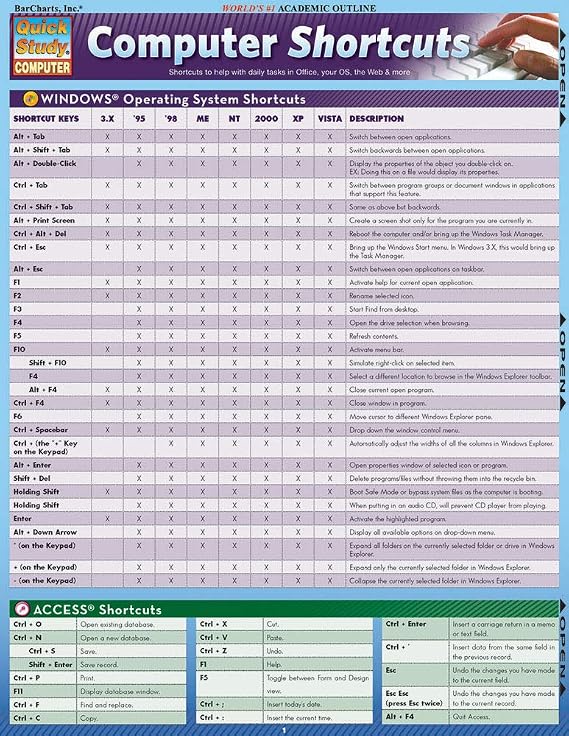
This 2-panel (4-page) guide points out helpful shortcuts that can be found within the most popular Windows PC and Apple Macintosh software.
Fast
Shipping
Free
Return*
Secure Packaging
100% Original Products
PCI DSS Compliance
ISO 27001 Certified

What Stands Out
產品詳情
- 2-panel (4-page) guide for saving time while using Windows PC and Apple Macintosh software
- Points out helpful shortcuts for Windows Operating System, Access, FrontPage, PowerPoint, Publisher, QuarkXPress, InDesign, Quicken, UNIX/Linux, Internet Explorer, Mozilla Firefox, Opera, Apple Macintosh
- Includes special character shortcuts for word processing
- Useful for surfing the Web and balancing virtual checkbooks
- Published in September 2008
- Part of the Quick Study Computer Misc. Supplies series
| Item Weight | 0.5 lbs (230 grams) |
Who Should Buy?
-
Students
Helpful for students learning computer software, providing quick reference to essential shortcuts for efficient study.
-
Office Workers
Ideal for office professionals needing quick access to keyboard shortcuts to enhance productivity and streamline tasks.
-
Beginner Users
Great for newcomers to computers, helping them quickly learn and memorize essential shortcut keys for various applications.
-
Advanced Users
Not suitable for advanced users who already know shortcuts, may find it too basic and lacking in depth.
-
Graphical Designers
Limited utility for graphic designers who require specialized shortcuts for design software beyond basic functionalities.
-
Casual Users
Casual users may not benefit significantly; shortcuts could be overwhelming and not frequently needed for basic tasks.
產品敘述
Computer Shortcuts QuickStudy Laminated Reference Guide Quick Study Computer
客戶問題&回答
-
題:
What are the benefits of using computer shortcuts?
回答: Utilizing computer shortcuts significantly enhances your efficiency and productivity while working. Instead of navigating through multiple menus, you can execute commands with a simple keyboard combination, saving you time and effort. For instance, using 'Ctrl+C' to copy and 'Ctrl+V' to paste can streamline your workflow drastically. This is particularly useful for professionals who work with large datasets or need to manage numerous documents simultaneously. -
題:
How can I learn computer shortcuts quickly?
回答: Learning computer shortcuts can be done effectively through repeated practice and utilizing cheat sheets. A Quick Study guide can provide you with a comprehensive list of the most essential shortcuts tailored to your operating system. Regularly referencing these shortcuts while you work will help commit them to memory. For example, practicing the shortcuts for document formatting in word processors can vastly improve your document creation speed. -
題:
Are computer shortcuts the same across different platforms?
回答: No, computer shortcuts can vary significantly between operating systems and applications. For instance, 'Ctrl+Z' undoes an action on Windows, while 'Command+Z' does the same on macOS. Familiarizing yourself with the shortcuts specific to your frequently used software will enhance your effectiveness. This can have a major impact on your productivity, especially if you work in a mixed-platform environment. -
題:
Which computer shortcuts are most useful for office work?
回答: Some of the most useful shortcuts for office work include 'Ctrl+S' for saving documents, 'Alt+Tab' for switching between open applications, and 'Ctrl+A' to select all text. Knowing these shortcuts can accelerate your workflow and reduce the time spent on repetitive tasks. For instance, if your job involves frequent file management, mastering these shortcuts will make navigating between documents more efficient. -
題:
How do I customize keyboard shortcuts on my computer?
回答: Customizing keyboard shortcuts can usually be done through the settings or preferences menu of most software applications. This feature allows you to set your own combinations for specific tasks. For example, if you use certain commands frequently, personalizing shortcuts can enhance your workflow. A graphic designer might customize shortcuts in design software to speed up their creative process. -
題:
Can computer shortcuts help with accessibility?
回答: Absolutely, computer shortcuts can greatly improve accessibility for users with disabilities. Many shortcuts are designed to reduce reliance on a mouse, enabling users to navigate and interact with software more easily. For individuals with mobility restrictions, utilizing keyboard shortcuts can facilitate smoother operation of their devices, making technology more inclusive and user-friendly. -
題:
How do I remember computer shortcuts longer-term?
回答: To retain computer shortcuts long-term, consistent usage is key. Incorporating these shortcuts into your daily workflow will help embed them in your memory. Using mnemonic devices can also aid memorization. For instance, you might associate 'Ctrl+P' with 'Print' because both words start with 'P'. Regular practice in relevant contexts, like document creation, will reinforce your memory effectively. -
題:
Where can I find a comprehensive list of computer shortcuts?
回答: A Quick Study guide is an excellent resource for finding a comprehensive list of computer shortcuts. It condenses essential information into an easy-to-reference format, making it a perfect learning tool for users of all skill levels. Utilizing such a guide can help you quickly identify the most relevant shortcuts for your needs, enhancing your productivity during tasks. -
題:
How do different software applications utilize shortcuts?
回答: Different software applications have unique sets of shortcuts tailored to their functionalities. For example, word processors have shortcuts geared towards text formatting, while spreadsheet programs focus on data manipulation. Familiarizing yourself with these specialized shortcuts can help maximize your efficiency. In a data analysis role, knowing the shortcuts for navigating and manipulating data in spreadsheets can significantly speed up your analysis tasks. -
題:
Where can I buy Computer Shortcuts Quick Study Computer Misc. Supplies?
回答: You can purchase the Computer Shortcuts Quick Study guide from Ubuy in Hong Kong. Ubuy offers a variety of educational resources, including this guide, which is designed to help you enhance your computer skills by providing a concise summary of essential shortcuts.
QuickStudy Templates Editorial Review
Customer reviews for the Computer Shortcuts Quick Study Computer Misc. Supplies are mixed. While some customers find it to be a very useful and affordable product with good information, others find it to be outdated and not helpful at all. It is worth noting that some reviews mention that the product was last updated for windows VISTA 2007, which makes it quite old. However, others appreciate the convenient shortcut collection and find it handy to keep nearby. Overall, if you have an older Windows operating system and are looking for a quick reference guide to computer shortcuts, this product may be worth checking out. However, if you have a more recent operating system, it is probably best to find a more up-to-date resource.
Customer Reviews & Ratings
-
5 星
100%
-
4 星
0%
-
3 星
0%
-
2 星
0%
-
1 星
0%
評價此產品
與其他客戶分享您的想法
優點
- Very affordable
- Convenient shortcut collection
- Handy to keep nearby
- Good information for study
缺點
- Outdated for newer Windows operating systems
Product Price History
重要資訊
- 限制:如跨國購買產品,請注意製造商的保固有可能無效;製造商服務選項可能無法使用;產品手冊、教學、以及安全警示可能不會是目的地國家的語言;產品(與附加材料)設計也許不會符合目的地國家的標準、規格、以及標示要求;且產品也許不會符合目的地國家的伏特數值與其他電力標準(需要使用合適的變壓器或轉接器)。收件者須負責確定該產品在目的地國家可合法進口。當在 Ubuy 或其聯盟夥伴網站上訂購時,收件者為記錄上的進口者,且必須遵從目的地國家的法律與規範。
- 由於 Ubuy 是一個全球搜尋引擎,並不是所有列於 Ubuy 的產品都有出售。產品須受出口/貿易法規規範。
HKD 89
現在訂購,約可在下列時間收貨: 星期六, 六月 27
This item is not restrict in my country.(Please click on above link if this item is not restrict in your country, So our team will review and allow.)
QTY:
Ubuy works hard to protect your security and privacy. Our advanced payment security system ensures confidentiality by encrypting your information during transmission using AES (Advanced Encryption Standards) and SSL (Secure Socket Layer) protocols. Your payment details are 100% secure as we do not share your payment details with third party sellers.
特色和優勢
- Find helpful shortcuts for the most popular Windows PC and Apple Macintosh software
- Saves time while surfing the web or balancing a virtual checkbook
- Includes special character shortcuts for word processing.