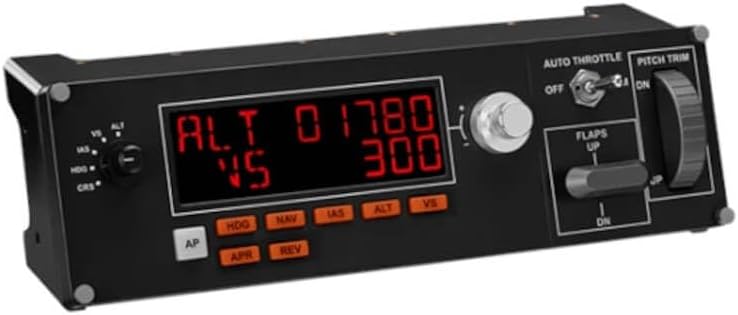



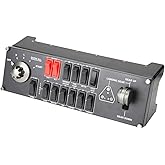
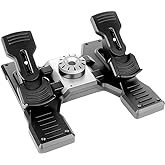
Logitech G USB G Pro Flight Multi Panel
Fingertip control over a multitude of settings within flight simulator software
Logitech G USB G Pro Flight Multi Panel
物品 #: 33899011

Logitech G USB G Pro Flight Multi Panel

物品 #: 33899011

HKD 1504

Price Details

Excluding Shipping & Custom charges ( Shipping and custom charges will be calculated on checkout )

*All items will import from 美國

0 ratings 轉寫評價
有存貨
美國 從USA商店導入
現在訂購,約可在下列時間收貨: 星期五, 七月 17
Our Top Logistics Partners
  • fedex
  • dhl
Fingertip control over a multitude of settings within flight simulator software
U-Care Warranty:
None
選擇一個計劃
fast shipping

Fast
Shipping

free return

Free
Return*

secure packaging

Secure Packaging

100% original products

100% Original Products

pci-dss

PCI DSS Compliance

iso certified

ISO 27001 Certified


paypal payment
visa payment
mastercard payment
Note: Step Down Voltage Transformer required for using electronics products of 美國 store (110-120). Recommended power converters 立即購買.

What Stands Out

Versatile Controls
The Logitech G Pro Flight Multi Panel offers comprehensive flight controls, enabling users to manage multiple aircraft functions with ease, enhancing realism and immersion in flight simulation.
Customizable Functionality
With programmable buttons, this panel allows users to tailor controls to their preferences, resolving user issues with limited cockpit interactions in simulations, ensuring a personalized flight experience.
High Compatibility
Designed for extensive compatibility with popular flight simulators, the Logitech G Pro Flight Multi Panel simplifies setup and integration, making it a go-to choice for serious flight enthusiasts seeking seamless performance.

產品詳情

Shop Logitech G Pro Flight Multi Panel & Switch Panel at Ubuy 香港. Enhance your flight simulators with these high-performance panels for maximum control and accuracy.
  • Fully customizable control panel for flight simulation
  • Works with Microsoft Flight Simulator X, 2004, and other major simulation software
  • Mounts onto Pro Flight Yoke System or custom cockpit setup
  • Compatible with Windows 7, 8, 8.1, and 10 or newer
  • Realistic landing gear control with LEDs indicating actual gear status
  • Modular and interchangeable for versatile setup configurations
Item Weight2 lbs (910 grams)

Who Should Buy?

Suitable For
  • Avid Flight Simulators

    Ideal for dedicated flight simulation enthusiasts looking for realistic controls and streamlined operation during immersive gameplay.

  • Advanced Gamers

    Perfect for experienced gamers wanting customizable controls and intuitive panel layouts for improved gaming performance.

  • Streamlined Cockpit Setup

    Great choice for users building a multi-panel cockpit setup seeking enhanced functionality and seamless integration with other hardware.

Not Suitable For
  • Casual Gamers

    May not be suitable for casual gamers who prefer simple gamepads over complex multi-panel setups.

  • Budget-Conscious Buyers

    Not ideal for those on a tight budget, as this multi-panel can be expensive compared to basic gaming peripherals.

  • Complete Novices

    Unsuitable for beginners to flight simulation, as it may require a learning curve with advanced controls and configurations.

產品敘述

Logitech G USB G Pro Flight Multi Panel

有疑問? 與我們聊天

客戶問題&回答

  • 題: What is the Logitech G USB G Pro Flight Multi Panel used for?

    回答: The Logitech G USB G Pro Flight Multi Panel is designed for flight simulation enthusiasts. It allows for realistic control of aircraft operations with dedicated switches for autopilot, flaps, gear, and more. This panel enhances immersion in flight sims like Microsoft Flight Simulator and X-Plane, providing gamers a tactile experience that standard controllers lack. With its customizable buttons and LED displays, users can easily monitor their flight operations, making it ideal for both beginners wanting to get started and seasoned pilots looking for precision.
  • 題: Is the Logitech G USB G Pro Flight Multi Panel compatible with all flight simulation software?

    回答: Yes, the Logitech G USB G Pro Flight Multi Panel is compatible with most major flight simulation software. It works seamlessly with platforms like Microsoft Flight Simulator, X-Plane, and Prepar3D. The unit is built to integrate easily with these simulations, providing shortcuts and functionality that enhance your flight experience. If you're a user of multiple flight sims, this versatility means you won't have to invest in different hardware for each title, making it a valuable addition to your setup.
  • 題: Can I customize the buttons on the Logitech G USB G Pro Flight Multi Panel?

    回答: Absolutely! The Logitech G USB G Pro Flight Multi Panel comes with customizable buttons that you can program to suit your preferences. You can assign different functions or commands as per your needs using Logitech's G Hub software. This feature is especially useful for creating personalized profiles, allowing you to optimize the panel for specific aircraft or flight missions. Whether you prefer a minimalist approach or need numerous commands at your fingertips, customization ensures you have the ideal setup tailored to your flying style.
  • 題: Does the Logitech G USB G Pro Flight Multi Panel require additional software?

    回答: Yes, while the Logitech G Pro Flight Multi Panel can be used with most flight simulation software out of the box, downloading Logitech's G Hub software is recommended for optimal functionality. This program allows users to customize button assignments, update firmware, and create specific profiles for different games. Utilizing G Hub ensures that you can take full advantage of the panel’s capabilities, making your flight simulations more efficient and enjoyable.
  • 題: What features does the Logitech G USB G Pro Flight Multi Panel have?

    回答: The Logitech G USB G Pro Flight Multi Panel is packed with features that enhance your simulation experience. It includes multiple dedicated switches for key functions like autopilot and managing flaps, along with a multi-function display that shows vital flight information. Its design allows for easy arrangement alongside other flight gear, facilitating a smoother user experience. Pilots can benefit from the clear visual feedback and tactile controls, which contribute to a more authentic and immersive simulation of real-world flying.
  • 題: Is the Logitech G USB G Pro Flight Multi Panel portable?

    回答: While the Logitech G USB G Pro Flight Multi Panel is designed primarily for home use, it is reasonably portable. Its compact size and USB connectivity make it easy to disconnect and move. However, the panel is best suited for a fixed setup where you can connect it to your gaming PC or console. For frequent travelers, consider how it fits in your gaming gear; it's lightweight and can be packed, but due to its specific functionality, you'll benefit most when it's readily accessible in your usual gaming environment.
  • 題: What are the installation steps for the Logitech G USB G Pro Flight Multi Panel?

    回答: To install the Logitech G USB G Pro Flight Multi Panel, first connect it to your PC using the provided USB cable. Then, download and install Logitech's G Hub software for optimal configuration. After installation, follow the on-screen prompts to configure your panel and customize button assignments. Once set up, you can launch your flight simulation software, and the panel should automatically integrate. With just these steps, you'll be ready to enhance your flight simulation experience in no time.
  • 題: How does the Logitech G USB G Pro Flight Multi Panel compare to other flight panels?

    回答: The Logitech G USB G Pro Flight Multi Panel is known for its quality and functionality compared to other flight panels on the market. It features a robust build, customizable controls, and compatibility with various flight simulation software. Users appreciate its clear multi-function display, which many entry-level panels may lack. While other options may offer more extensive features, the G Pro Flight Multi Panel strikes a balance between price and performance, making it a top choice for those seeking reliable and effective flight control.
  • 題: What should I do if my Logitech G USB G Pro Flight Multi Panel is not working?

    回答: If your Logitech G USB G Pro Flight Multi Panel is not functioning properly, first ensure that it is connected securely to your PC. Check the USB port and cable for any damage. If the connection is fine, try reinstalling the G Hub software, as outdated drivers can often cause issues. Additionally, consult the troubleshooting guide in the software or visit the Logitech support website for further assistance. Many users find that reinstalling the software resolves minor technical glitches and restores functionality.
  • 題: Where can I buy the Logitech G USB G Pro Flight Multi Panel in Hong Kong?

    回答: You can buy the Logitech G USB G Pro Flight Multi Panel in Hong Kong from Ubuy. Ubuy offers a wide selection of Logitech products, providing a seamless shopping experience and reliable service. You can also find various shipping options, customer reviews, and detailed product information to make an informed choice. Shopping at Ubuy ensures you receive a genuine product along with support that enhances your purchasing journey.

Logitech G Flight Controls Editorial Review

The Logitech G USB G Pro Flight Multi Panel is an easy-to-use and set-up product that is a good addition to Flight Simulator 2020 for flight simmers. It works great with MSFS 2020, saving time and making the flying experience more enjoyable. It serves as an autopilot for aircraft with a digital airspeed indicator, and includes adjustments for altitude, vertical speed, heading, and more. The drawbacks include the slow adjustment of the trim wheel, the lack of replacement options, and the panel sometimes being buggy.

Customer Reviews & Ratings

5.0
1 客戶評分
  • 5 星
    100%
  • 4 星
    0%
  • 3 星
    0%
  • 2 星
    0%
  • 1 星
    0%

評價此產品

與其他客戶分享您的想法

優點

  • easy to use and set-up
  • a good addition to Flight Simulator 2020 for flight simmers
  • visual screen readout of autopilot settings during flight
  • adds realism to the simulation
  • time-saver and aggravation-saver

缺點

  • slow adjustment of the trim wheel

Platform Trust & Buyer Confidence

trustpilot logo
3.9/5 90 + reviews
Read reviews
S
Sam
Verified buyer

“Great product, good packing, the goods arrived quickly and well protected.”

6 Jun 2026 · via Trustpilot
RD
Roxy
Verified buyer

“Great products and services”

17 April 2026 · via Trustpilot
SB
Samuel
Verified buyer

“Good market place with decent prices”

8 October 2025 · via Trustpilot
G
Gram4eild
Verified buyer

“whatever you want you will get delivered at reasonable pricing. I am a regular customer.”

18 Mar 2025 · via Trustpilot
HT
Henry
Verified buyer

“I've had a wonderful experience shopping with UBUY Hong Kong. The customer service is outstanding, and my orders always arrive on time. Very satisfied with their services!”

2 Jun 2024 · via Trustpilot
安全結帳 Global Delivery Easy Returns Genuine Products

Product Price History

重要資訊

  • 限制:如跨國購買產品,請注意製造商的保固有可能無效;製造商服務選項可能無法使用;產品手冊、教學、以及安全警示可能不會是目的地國家的語言;產品(與附加材料)設計也許不會符合目的地國家的標準、規格、以及標示要求;且產品也許不會符合目的地國家的伏特數值與其他電力標準(需要使用合適的變壓器或轉接器)。收件者須負責確定該產品在目的地國家可合法進口。當在 Ubuy 或其聯盟夥伴網站上訂購時,收件者為記錄上的進口者,且必須遵從目的地國家的法律與規範。
  • 由於 Ubuy 是一個全球搜尋引擎,並不是所有列於 Ubuy 的產品都有出售。產品須受出口/貿易法規規範。