- 主頁 /
- 書 /
- Reference Books /
- All Manuals & Guides /
- Step by Step Tutorials on Deep Learning Using Scikit-Le...
0 ratings


物品 #:
273922392
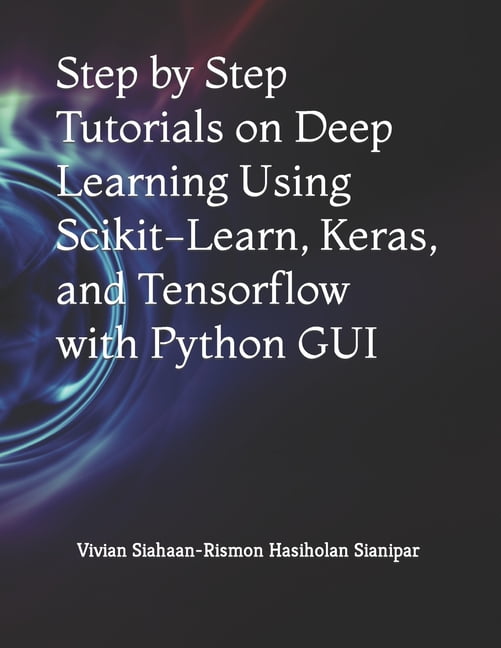
Step by Step Tutorials on Deep Learning Using Scikit-Learn, Keras, and Tensorflow with Python GUI, (Paperback)
物品 #:
273922392
HKD 394
Price Details
Excluding Shipping & Custom charges ( Shipping and custom charges will be calculated on checkout )
*All items will import from 美國
0 ratings
轉寫評價
有存貨
 從USA商店導入
QTY:
庫存僅剩 1 件商品。
現在訂購,約可在下列時間收貨: Sunday, 十一月 01
Secured transaction
Ubuy works hard to protect your security and privacy. Our advanced payment security system ensures confidentiality by encrypting your information during transmission using AES (Advanced Encryption Standards) and SSL (Secure Socket Layer) protocols. Your payment details are 100% secure as we do not share your payment details with third party sellers.
Our Top Logistics Partners


Fast
Shipping

Free
Return*

Secure Packaging

100% Original Products

PCI DSS Compliance

ISO 27001 Certified



Note: Step Down Voltage Transformer required for using electronics products of 美國 store (110-120). Recommended power converters 立即購買.


產品詳情
- In this book, you will learn how to use TensorFlow, Keras, Scikit-Learn, OpenCV, Pandas, NumPy and other libraries to implement deep learning on classifying fruits, classifying cats/dogs, detecting furnitures, and classifying fashion. In Chapter 1, you will learn to create GUI applications to display line graph using PyQt. You will also learn how to display image and its histogram. In Chapter 2, you will learn how to use TensorFlow, Keras, Scikit-Learn, OpenCV, Pandas, NumPy and other libraries to perform classifying fruits using Fruits 360 dataset using Transfer Learning and CNN models. You will build a GUI application for this purpose. Here's the outline of the steps, focusing on transfer learning: 1. Dataset Preparation: Download the Fruits 360 dataset from Kaggle. Extract the dataset files and organize them into appropriate folders for training and testing. Install the necessary libraries like TensorFlow, Keras, Scikit-Learn, OpenCV, Pandas, and NumPy; Data Preprocessing: Use OpenCV to read and load the fruit images from the dataset. Resize the images to a consistent size to feed them into the neural network. Convert the images to numerical arrays using NumPy. Normalize the image pixel values to a range between 0 and 1. Split the dataset into training and testing sets using Scikit-Learn. 3. Building the Model with Transfer Learning: Import the required modules from TensorFlow and Keras. Load a pre-trained model (e.g., VGG16, ResNet50, InceptionV3) without the top (fully connected) layers. Freeze the weights of the pre-trained layers to prevent them from being updated during training. Add your own fully connected layers on top of the pre-trained layers. Compile the model by specifying the loss function, optimizer, and evaluation metrics; 4. Model Training: Use the prepared training data to train the model. Specify the number of epochs and batch size for training. Monitor the training process for accuracy and loss using callbacks; 5. Model Evaluation: Evaluate the trained model on the test dataset using Scikit-Learn. Calculate accuracy, precision, recall, and F1-score for the classification results; 6. Predictions: Load and preprocess new fruit images for prediction using the same steps as in data preprocessing. Use the trained model to predict the class labels of the new images. In Chapter 3, you will learn how to use TensorFlow, Keras, Scikit-Learn, OpenCV, Pandas, NumPy and other libraries to perform classifying cats/dogs using dataset using Using CNN with Data Generator. You will build a GUI application for this purpose. The following steps are taken: Set up your development environment: Install the necessary libraries such as TensorFlow, Keras, Scikit-Learn, OpenCV, Pandas, NumPy, and any other dependencies required for the tutorial; Load and preprocess the dataset: Use libraries like OpenCV and NumPy to load and preprocess the dataset. Split the dataset into training and testing sets; Design and train the classification model: Use TensorFlow and Keras to design a convolutional neural network (CNN) model for image classification. Define the architecture of the model, compile it with an appropriate loss function and optimizer, and train it using the training dataset; Evaluate the model: Evaluate the trained model using the testing dataset. Calculate metrics such as accuracy, precision, recall, and F1 score to assess the model's performance; and so on. In Chapter 4, you will learn how to use TensorFlow, Keras, Scikit-Learn, OpenCV, Pandas, NumPy and other libraries to perform detecting furnitures using Furniture Detector dataset using VGG16 model. You will build a GUI application for this purpose, and so on. In Chapter 5, you will learn how to use TensorFlow, Keras, Scikit-Learn, OpenCV, Pandas, NumPy and other libraries to perform classifying fashion using Fashion MNIST dataset using CNN model. You will build a GUI a
| Book format | Paperback |
| Edition | 1 |
| Pages | 324 |
| Language | English |
| Brand | Rismon Hasiholan Sianipar |
| Pub date | 2021-04-24 |
| Author | Independently Published |
| Subgenre | Artificial Intelligence |
| Genre | Computing & Internet |
| Bisac subject heading | Computers |
| Dimensions | 8.50 x 0.68 x 11.00 Inches (21.6 x 1.7 x 27.9 cm) |
| Age group | Adult |
| Retail packaging | Single Piece |
| Original languages | English |
產品敘述
Step by Step Tutorials on Deep Learning Using Scikit-Learn, Keras, and Tensorflow with Python GUI, (Paperback)
有疑問? 與我們聊天
客戶問題與解答
-
題:
如何從 Ubuy 在線購物 Step by Step Tutorials on Deep Learning Using?
回答: 從 Ubuy 在線購物 Step by Step Tutorials on Deep Learning Using 非常簡單。. 您只需搜索產品,在結賬時選擇運輸方式,然後將其運送到您所在的位置。 -
題:
Step by Step Tutorials on Deep Learning Using 可以在 Hong Kong 在線購物嗎?
回答: 是的,您可以在 Ubuy Hong Kong 以合理的價格購買該產品。. Step by Step Tutorials on Deep Learning Using 在本地不可用,但您可以信任我們的快遞服務。 -
題:
下訂單後需要多長時間才能收到產品?
回答: 您訂購的產品的交貨時間根據您訂購的商品和您選擇的運輸方式而有所不同。. 結賬時會提到預計送貨時間,所以購物時請放心。
Rismon Hasiholan Sianipar All Manuals & Guides Editorial Review
未找到編輯評論
Customer Reviews & Ratings
1 客戶評分
-
5 星
100%
-
4 星
0%
-
3 星
0%
-
2 星
0%
-
1 星
0%
評價此產品
與其他客戶分享您的想法
Platform Trust & Buyer Confidence

FZ
F Zhang
Verified buyer
“Good product, and smooth delivery!”
18-Jul-26 · via Trustpilot
RD
Roxy
Verified buyer
“Great products and services”
17 April 2026 · via Trustpilot
KD
Khushi
Verified buyer
“Ubuy Hong Kong is a game-changer. I was looking for a specific American brand that doesn't ship to Asia, and Ubuy had it in stock. The selection of global products is incredible. It saves me the hassle of using freight forwarders or asking friends to bring items over. The process was seamless from checkout to delivery”
6 July 2026 · via Trustpilot
KM
kritika
Verified buyer
“I?m always nervous buying electronics and skincare online, but Ubuy Hong Kong delivered exactly what I ordered and it was 100% genuine. It?s refreshing to find a platform that you can actually trust with premium brands. Will definitely be a returning customer.”
3 July 2026 · via Trustpilot
S
Sam
Verified buyer
“Great product, good packing, the goods arrived quickly and well protected.”
6 June 2026 · via Trustpilot
WHY SHOP WITH US
安全結帳
Global Delivery
Easy Returns
Genuine Products
Product Price History
重要資訊
- 限制:如跨國購買產品,請注意製造商的保固有可能無效;製造商服務選項可能無法使用;產品手冊、教學、以及安全警示可能不會是目的地國家的語言;產品(與附加材料)設計也許不會符合目的地國家的標準、規格、以及標示要求;且產品也許不會符合目的地國家的伏特數值與其他電力標準(需要使用合適的變壓器或轉接器)。收件者須負責確定該產品在目的地國家可合法進口。當在 Ubuy 或其聯盟夥伴網站上訂購時,收件者為記錄上的進口者,且必須遵從目的地國家的法律與規範。
- 由於 Ubuy 是一個全球搜尋引擎,並不是所有列於 Ubuy 的產品都有出售。產品須受出口/貿易法規規範。
HKD 394
現在訂購,約可在下列時間收貨: Sunday, 十一月 01
This item is not restrict in my country.(Please click on above link if this item is not restrict in your country, So our team will review and allow.)
QTY:
庫存僅剩 1 件商品。
Secured transaction
PCI DSS compliant and ISO 27001:2022 certified, with encrypted payments and full buyer protection on every order.
Our Top Logistics Partners
Fastest cross-border delivery
Ubuy Assurance
Experience worry-free shopping with 100% original products, PCI DSS-compliant payment security, ISO 27001-certified data protection, the fastest cross-border delivery, free returns *, and secure packaging on every order.