





物品 #:
3366799
Epson Workforce ES-400 Color Duplex Document Scanner for PC and Mac, Auto Document Feeder (ADF)
物品 #:
3366799
HKD 3918
Price Details
Excluding Shipping & Custom charges ( Shipping and custom charges will be calculated on checkout )
*All items will import from 美國
0 ratings
轉寫評價
有存貨
 從USA商店導入
QTY:
庫存僅剩 1 件商品。
現在訂購,約可在下列時間收貨: 星期六, 七月 04
Secured transaction
Ubuy works hard to protect your security and privacy. Our advanced payment security system ensures confidentiality by encrypting your information during transmission using AES (Advanced Encryption Standards) and SSL (Secure Socket Layer) protocols. Your payment details are 100% secure as we do not share your payment details with third party sellers.
Our Top Logistics Partners


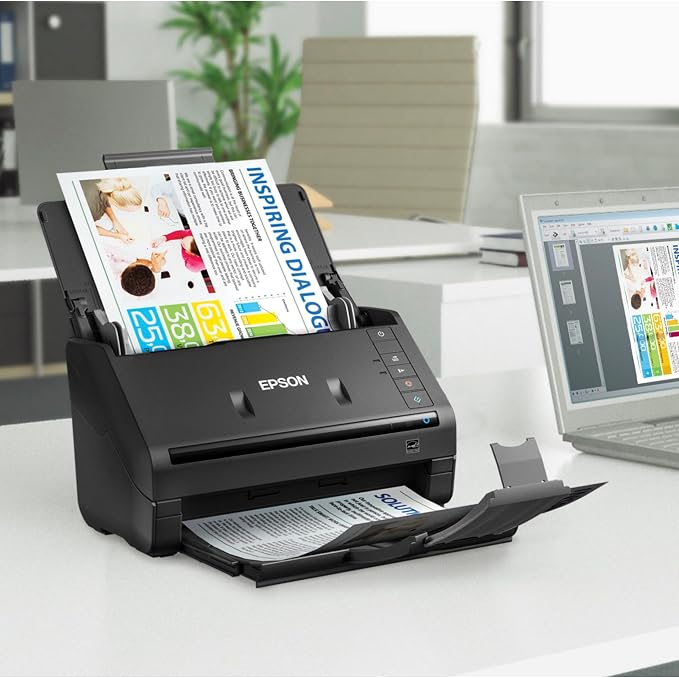
Get organized in a snap scan upto 35 ppm/70 ipm (1); Single Step Technology captures both sides in one pass

Fast
Shipping

Free
Return*

Secure Packaging

100% Original Products

PCI DSS Compliance

ISO 27001 Certified


Note: Step Down Voltage Transformer required for using electronics products of 美國 store (110-120). Recommended power converters 立即購買.


What Stands Out
Fast Scanning
Achieve quick, high-quality scans with speeds up to 35 pages per minute, enhancing productivity for busy professionals and offices.
Duplex Scanning
Effortlessly scan both sides of documents simultaneously, saving time and ensuring efficiency for double-sided materials.
Auto Document Feeder
The 50-sheet ADF allows for continuous scanning of multi-page documents, minimizing manual handling and streamlining workflows.
產品詳情
- Scan up to 35 ppm/70 ipm with Single-Step Technology
- Robust 50-page Auto Document Feeder for easy scanning of stacks of paper
- Includes intuitive Epson ScanSmart Software for easy scanning and automatic file naming
- TWAIN driver for easy connectivity to most document management software
- Built-in Nuance Optical Character Recognition for creating searchable PDFs and editable Word and Excel files
- Compatible with popular cloud storage services for easy sharing and collaboration
| Scanner Type | Document |
| Connection Type | USB |
| Resolution | 1200 |
| Wattage | 17 watts |
| Color Depth | 24 bits |
| Standard Sheet Capacity | 50 |
| Optical Sensor Technology | CCD |
| Greyscale Depth | 16-bit input/8-bit output (40.6 cm) |
| Media Type | Photo ; Receipt ; Business Card ; Paper |
| Item Dimensions D x W x H | 12.6"D x 11.6"W x 12.3"H (32 x 29.5 x 31.2 cm) |
| Item Weight | 3670 Grams |
| Minimum System Requirements | Windows 2000 Professional |
| Brand | Epson |
| Model Name | WorkForce ES-400 |
| UPC | 010343920309 |
| Global Trade Identification Number | 00010343920309 |
| Built-In Media | AC adapter and power cable, ES-400 Document Scanner, Start Here poster, SuperSpeed USB cable |
| Unit Count | 1.0 Count |
| Item Type Name | Epson WorkForce ES-400 Color Duplex Document Scanner for PC and Mac, Auto Document Feeder (ADF) |
| Manufacturer | Epson |
| Connectivity Technology | USB |
| Product Dimensions (L x W x H) | 12.6"D x 11.6"W x 12.3"H (32 x 29.5 x 31.2 cm) |
What's in the box
ES-400 Document Scanner
Start Here poster
SuperSpeed USB cable
AC adapter and power cable
Who Should Buy?

-
Office Professionals
Ideal for busy professionals needing to scan, organize, and manage documents efficiently in a fast-paced environment.
-
Students and Researchers
Great for students who need to digitize notes and research materials for easy access and organization.
-
Small Business Owners
Perfect for small business owners needing to document and store receipts, contracts, and essential paperwork promptly.

-
Occasional Users
Not suitable for infrequent use, as its features may be underutilized and not cost-effective for rare scanning.
-
Photographers
Not ideal for photographers requiring high-quality image scanning for photographs or fine art, where detail matters.
-
Large Scale Scanning
May struggle with heavy-duty scanning needs, as it is designed for moderate volume rather than extensive batch processing.
產品敘述
有疑問? 與我們聊天
客戶問題&回答
-
題:
What are the key features of the Epson WorkForce ES-400 scanner?
回答: The Epson WorkForce ES-400 is designed to offer high-performance scanning with features like fast color duplex scanning at up to 35 pages per minute. It boasts an Auto Document Feeder (ADF) that can hold up to 50 sheets, making bulk scanning tasks seamless. The scanner is compatible with both PC and Mac systems, ensuring versatility for various users. This device is ideal for professionals who need reliable and efficient document management, such as in offices that handle large volumes of paperwork. -
題:
How does duplex scanning work on the ES-400?
回答: Duplex scanning on the Epson WorkForce ES-400 allows you to scan both sides of a document in a single pass. This feature uses advanced technology to capture the front and back of pages simultaneously, which significantly reduces scanning time compared to traditional single-sided scanning. It is particularly useful for businesses that often deal with double-sided documents, such as contracts or reports, streamlining the workflow and enhancing productivity. -
題:
Is the Epson WorkForce ES-400 compatible with mobile devices?
回答: Yes, the Epson WorkForce ES-400 supports mobile scanning through the Epson DocumentScan app. This app allows you to connect your smartphone or tablet to the scanner, enabling you to scan documents directly to your device or cloud storage. This functionality is valuable for users who need to manage documents on-the-go, making it ideal for business professionals and students who need to digitize documents while away from their primary workstation. -
題:
What types of documents can I scan with the ES-400?
回答: The Epson WorkForce ES-400 is versatile and can scan a variety of document types, including single sheets, multi-page reports, business cards, and receipts. Its sturdy design accommodates documents of differing sizes and thicknesses, allowing you to efficiently manage paperwork in various formats. This makes it an ideal choice for professionals in fields like finance or legal, where maintaining organized and accessible document records is critical. -
題:
What is the scanning resolution of the Epson ES-400?
回答: The Epson WorkForce ES-400 offers an optical resolution of up to 600 dpi, which ensures that scanned documents are crisp and clear. The high resolution is essential for capturing fine details in text and images, making it suitable for both standard document scanning and high-quality graphics. Users in creative fields, such as graphic design or photography, will find this feature particularly beneficial for preserving image quality during digital archiving. -
題:
Do I need any special software to use the ES-400?
回答: No special software is required to use the Epson WorkForce ES-400. It is compatible with standard scanning applications on both PC and Mac platforms. The scanner comes with Epson Scan and Document Capture Pro software, which allows for easy management and editing of scanned documents. This makes it user-friendly for those in administrative roles who may not be tech-savvy yet still need to digitize and organize files efficiently. -
題:
Can the ES-400 scan in color?
回答: Yes, the Epson WorkForce ES-400 is capable of scanning in full color. Its advanced scanning technology captures vibrant, true-to-life colors in high-quality detail. This feature is crucial for users who need to digitize colored documents, images, or graphics. It’s especially beneficial for businesses in marketing or graphic design, where color accuracy is essential for maintaining brand integrity in digital files. -
題:
What connectivity options does the ES-400 offer?
回答: The Epson WorkForce ES-400 offers USB 3.0 connectivity for fast data transfer along with compatibility for various cloud storage services. This flexibility allows easy integration into office networks and enables users to scan documents directly to cloud locations or linked devices. Such capabilities are particularly useful in team environments where quick access to scanned documents is vital for collaboration and productivity. -
題:
How does the Auto Document Feeder (ADF) enhance scanning productivity?
回答: The Auto Document Feeder (ADF) on the Epson WorkForce ES-400 allows you to load multiple pages at once—up to 50 sheets—enabling uninterrupted scanning of large batches. This significantly increases productivity for both individuals and businesses as it minimizes the need for manual feeding. It's ideal for busy office environments or home users managing numerous documents, allowing for quicker project completion without sacrificing quality. -
題:
Where can I buy the Epson WorkForce ES-400 Color Duplex Document Scanner?
回答: You can purchase the Epson WorkForce ES-400 Color Duplex Document Scanner for PC and Mac from Ubuy in Hong Kong. Ubuy offers a convenient platform for locating the scanner, with options for fast checkout and reliable customer service, ensuring a smooth shopping experience for your document management needs.
Epson Document Scanners Editorial Review


The Epson WorkForce ES-400 Color Duplex Document Scanner is a suitable business-grade scanner for home and small business users that can handle mixed paper sizes. It includes drivers for enterprise document management software. The driver and bundled software allow the user to add more pages to what has already been scanned, reorder, delete, and add more pages before saving the file. The scanner is compatible with Windows 7, 8.x (32-bit, 64-bit), Vista (32-bit, 64-bit), XP SP3 (32-bit), XP Professional x64 Edition, and Mac OS X 10.5.8 – 10.13.x. The scanner can scan to cloud services and requires an internet connection for software download and installation. It is fast and produces clear scans, but it tends to jam when a large stack of documents is loaded, and the 400II version does not connect wirelessly. The scanner comes with an app that is easy to navigate but does not have enough features to make tracking of receipts easier.
Customer Reviews & Ratings
1464 客戶評分
-
5 星
81%
-
4 星
10%
-
3 星
3%
-
2 星
1%
-
1 星
5%
評價此產品
與其他客戶分享您的想法
優點
- Suitable for home and small businesses
- Scans mixed paper sizes
- Compatible with multiple operating systems
- Can scan to cloud services
- Produces clear scans
缺點
- Tends to jam with large stacks of documents
Product Price History
重要資訊
- 限制:如跨國購買產品,請注意製造商的保固有可能無效;製造商服務選項可能無法使用;產品手冊、教學、以及安全警示可能不會是目的地國家的語言;產品(與附加材料)設計也許不會符合目的地國家的標準、規格、以及標示要求;且產品也許不會符合目的地國家的伏特數值與其他電力標準(需要使用合適的變壓器或轉接器)。收件者須負責確定該產品在目的地國家可合法進口。當在 Ubuy 或其聯盟夥伴網站上訂購時,收件者為記錄上的進口者,且必須遵從目的地國家的法律與規範。
- 由於 Ubuy 是一個全球搜尋引擎,並不是所有列於 Ubuy 的產品都有出售。產品須受出口/貿易法規規範。
HKD 3918
現在訂購,約可在下列時間收貨: 星期六, 七月 04
This item is not restrict in my country.(Please click on above link if this item is not restrict in your country, So our team will review and allow.)
QTY:
庫存僅剩 1 件商品。
Secured transaction
Ubuy works hard to protect your security and privacy. Our advanced payment security system ensures confidentiality by encrypting your information during transmission using AES (Advanced Encryption Standards) and SSL (Secure Socket Layer) protocols. Your payment details are 100% secure as we do not share your payment details with third party sellers.
Our Top Logistics Partners
Fastest cross-border delivery