
物品 #:
182358732
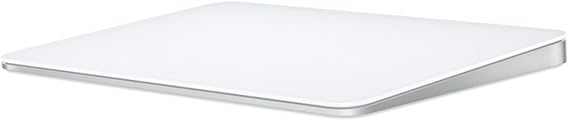
Apple Magic Trackpad - White Multi-Touch Surface
物品 #:
182358732
HKD 788
Price Details
Excluding Shipping & Custom charges ( Shipping and custom charges will be calculated on checkout )
*All items will import from 美國
0 ratings
轉寫評價
有存貨
 從USA商店導入
QTY:
現在訂購,約可在下列時間收貨: 星期三, 七月 15
Secured transaction
Ubuy works hard to protect your security and privacy. Our advanced payment security system ensures confidentiality by encrypting your information during transmission using AES (Advanced Encryption Standards) and SSL (Secure Socket Layer) protocols. Your payment details are 100% secure as we do not share your payment details with third party sellers.
Our Top Logistics Partners


Magic Trackpad connects wirelessly to your device via Bluetooth and the rechargeable internal battery means no loose batteries to replace

Fast
Shipping

Free
Return*

Secure Packaging

100% Original Products

PCI DSS Compliance

ISO 27001 Certified


Note: Step Down Voltage Transformer required for using electronics products of 美國 store (110-120). Recommended power converters 立即購買.


What Stands Out
Wireless Convenience
The Apple Magic Trackpad offers seamless wireless connectivity via Bluetooth, allowing users to enjoy a clutter-free workspace without the hassle of cables.
Multi-Touch Support
Experience intuitive gestures and Multi-Touch capabilities, enabling efficient navigation and enhanced productivity on your Mac or iPad with simple swipes and taps.
Rechargeable Battery
Equipped with a rechargeable battery, the Trackpad provides extended usage on a single charge, eliminating the need for disposable batteries and promoting sustainability.
產品詳情
| Item Weight | 0.7 lbs (320 grams) |
Who Should Buy?

-
Graphic Designers
The precision and multi-touch capabilities enhance their workflow and make intricate designs easier to create.
-
Frequent Mac Users
Ideal for users deeply integrated into the Apple ecosystem, enhancing productivity and comfort during extended use.
-
Minimalist Setups
Perfect for users who prefer a clean and clutter-free workspace without sacrificing functionality.

-
Gaming Enthusiasts
Not ideal for gamers needing quick responses and tactile feedback typically offered by traditional gaming mice.
-
Budget-Conscious Buyers
Its premium price point may deter users looking for more affordable input devices with similar functionalities.
-
Traveling Professionals
Bulkier than traditional mice, making it less practical for professionals needing portability and ease of travel.
產品敘述
Apple Magic Trackpad - White Multi-Touch Surface
有疑問? 與我們聊天
客戶問題&回答
-
題:
What is the Apple Magic Trackpad and how does it work?
回答: The Apple Magic Trackpad is a wireless input device that offers a large multi-touch surface, enabling users to interact with their Mac through gestures. It utilizes advanced technology to recognize various finger movements, allowing for fluid navigation, scrolling, and zooming. The trackpad's ability to detect varying pressure and gestures enhances productivity. For instance, you can swipe between pages, pinch to zoom in and out, or scroll through documents effortlessly, making it ideal for graphic designers, photographers, and anyone who values gesture control. -
題:
Is the Apple Magic Trackpad compatible with all Mac devices?
回答: Yes, the Apple Magic Trackpad is compatible with a wide range of Mac devices, particularly those running macOS. To utilize all its features effectively, it's best used with MacBook Pro, iMac, and Mac Mini models. It connects via Bluetooth, ensuring easy pairing with your Mac. This compatibility allows users to take advantage of the seamless integration of MacOS gestures and functionality. For example, users can benefit from features like Mission Control and App Exposé when using this trackpad with compatible Macs. -
題:
Can I use the Apple Magic Trackpad with other devices?
回答: While primarily designed for Mac computers, the Apple Magic Trackpad can be paired with certain iPads running the latest iPadOS. The multi-touch gestures can be utilized on supported iPads, enhancing productivity for tasks like note-taking or graphic design. However, the full range of features may be limited compared to its performance on macOS. This makes it beneficial for users who prefer using a larger trackpad interface while working on creative projects or multitasking across devices. -
題:
What are the dimensions and design features of the Apple Magic Trackpad?
回答: The Apple Magic Trackpad features a sleek design, measuring 6.3 inches wide and 4.4 inches deep, making it compact yet spacious enough for diverse gestures. The multi-touch surface is smooth and responsive, allowing for intuitive interaction. The low-profile design not only looks elegant but also enhances ergonomic comfort. Users can seamlessly integrate it into their workspace, whether it's a standing desk or casual home office setup. Its aesthetic also complements Apple’s design language, making it a stylish addition to any setup. -
題:
How does the battery life of the Apple Magic Trackpad hold up?
回答: The Apple Magic Trackpad boasts an impressive battery life, typically lasting for about a month on a single charge, depending on usage. It charges using a Lightning connector, making recharging convenient and quick. The low-energy design ensures that it’s always ready for use when you need it. For instance, users can plug it in while using it for uninterrupted performance, making it particularly useful for long working sessions or during important presentations. -
題:
What gestures can you perform with the Apple Magic Trackpad?
回答: The Apple Magic Trackpad supports a variety of gestures, including swiping, pinching, rotating, and clicking. This allows users to perform tasks like scrolling through web pages, zooming into images, and switching between applications seamlessly. Familiar gestures such as three-finger swipe for navigating Safari or swiping down with four fingers for Mission Control become second nature over time, significantly enhancing the user experience. Such gestures are especially beneficial for professionals in creative fields, where speed and precision are essential. -
題:
Can I customize the gestures on the Apple Magic Trackpad?
回答: Absolutely! Users have the ability to customize gestures in the System Preferences on macOS. This means you can configure different gestures based on your workflow or preferences. For instance, if you frequently use specific applications, you can assign gestures to open them quickly. This customization allows for a more personalized and efficient work experience, helping users streamline their processes, particularly in design or productivity tasks. -
題:
What materials are used in the construction of the Apple Magic Trackpad?
回答: The Apple Magic Trackpad is constructed from durable materials, including an aluminum body that affords both a premium feel and robustness. The glass surface is designed for a smooth, responsive touch experience, making it easier to execute multi-touch gestures. Users appreciate not only the functionality but also the elegance that complements their workspace. Whether for everyday tasks or demanding creative projects, the material quality enhances usability and longevity. -
題:
Is there a difference between the regular Magic Trackpad and the Magic Trackpad with Force Touch?
回答: Yes, the primary difference lies in the Force Touch capability included in the latest models. The Force Touch technology allows the trackpad to detect pressure, offering additional functionality beyond standard clicks. This means users can perform different actions based on how hard they press, enhancing workflow customization. For example, a light press might select an item, while a deeper press could bring up quick actions. This feature is especially useful for creative professionals who require precision in their design work. -
題:
Where can I buy Apple Magic Trackpad - Black Multi-Touch Surface in Hong Kong?
回答: You can purchase the Apple Magic Trackpad - Black Multi-Touch Surface at Ubuy. It offers a variety of options to suit your preferences, and you can easily browse through product details, reviews, and available configurations to find the perfect match for your needs.
Apple Editorial Review
未找到編輯評論
Customer Reviews & Ratings
1 客戶評分
-
5 星
100%
-
4 星
0%
-
3 星
0%
-
2 星
0%
-
1 星
0%
評價此產品
與其他客戶分享您的想法
Platform Trust & Buyer Confidence

S
Sam
Verified buyer
“Great product, good packing, the goods arrived quickly and well protected.”
6 Jun 2026 · via Trustpilot
RD
Roxy
Verified buyer
“Great products and services”
17 April 2026 · via Trustpilot
SB
Samuel
Verified buyer
“Good market place with decent prices”
8 October 2025 · via Trustpilot
G
Gram4eild
Verified buyer
“whatever you want you will get delivered at reasonable pricing. I am a regular customer.”
18 Mar 2025 · via Trustpilot
HT
Henry
Verified buyer
“I've had a wonderful experience shopping with UBUY Hong Kong. The customer service is outstanding, and my orders always arrive on time. Very satisfied with their services!”
2 Jun 2024 · via Trustpilot
安全結帳
Global Delivery
Easy Returns
Genuine Products
Product Price History
重要資訊
- 限制:如跨國購買產品,請注意製造商的保固有可能無效;製造商服務選項可能無法使用;產品手冊、教學、以及安全警示可能不會是目的地國家的語言;產品(與附加材料)設計也許不會符合目的地國家的標準、規格、以及標示要求;且產品也許不會符合目的地國家的伏特數值與其他電力標準(需要使用合適的變壓器或轉接器)。收件者須負責確定該產品在目的地國家可合法進口。當在 Ubuy 或其聯盟夥伴網站上訂購時,收件者為記錄上的進口者,且必須遵從目的地國家的法律與規範。
- 由於 Ubuy 是一個全球搜尋引擎,並不是所有列於 Ubuy 的產品都有出售。產品須受出口/貿易法規規範。
HKD 788
現在訂購,約可在下列時間收貨: 星期三, 七月 15
This item is not restrict in my country.(Please click on above link if this item is not restrict in your country, So our team will review and allow.)
QTY:
Secured transaction
PCI DSS compliant and ISO 27001:2022 certified, with encrypted payments and full buyer protection on every order.
Our Top Logistics Partners
Fastest cross-border delivery
特色和優勢
- Wireless, rechargeable convenience
- Magic tracking experience with sensors
- Works with Mac or iPad
- Efficient and comfortable scrolling and swiping
- Incredibly long-lasting battery that lasts up to a month
- Comes with a USB-C to Lightning Cable for charging and pairing
Ubuy Assurance
Experience worry-free shopping with 100% original products, PCI DSS-compliant payment security, ISO 27001-certified data protection, the fastest cross-border delivery, free returns *, and secure packaging on every order.