






物品 #:
105543997
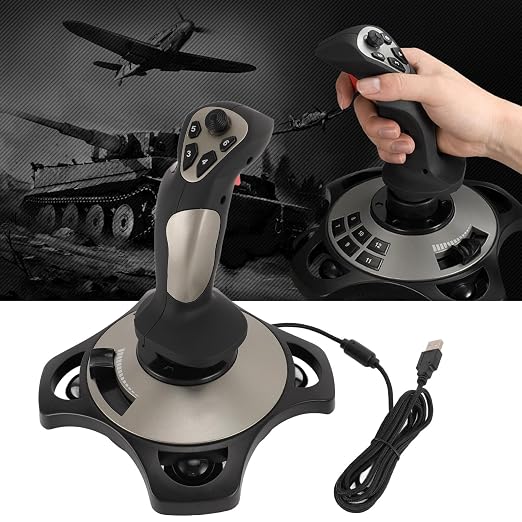
Flight Simulation Controller Joystick for PC, PC Flight Joystick Controls with Vibration Function Throttle Control for PC Computer Laptop for 7 8 10
物品 #:
105543997
HKD 923
Price Details
Excluding Shipping & Custom charges ( Shipping and custom charges will be calculated on checkout )
*All items will import from 美國
12%
0 ratings
轉寫評價
有存貨
 從USA商店導入
QTY:
存貨僅剩 4 個物品。
現在訂購,約可在下列時間收貨: Monday, 七月 13
Secured transaction
Ubuy works hard to protect your security and privacy. Our advanced payment security system ensures confidentiality by encrypting your information during transmission using AES (Advanced Encryption Standards) and SSL (Secure Socket Layer) protocols. Your payment details are 100% secure as we do not share your payment details with third party sellers.
Our Top Logistics Partners


Experience the thrill of flight simulation with our easy-to-use joystick, featuring advanced controls, vibration feedback, and wide compatibility.

Fast
Shipping

Free
Return*

Secure Packaging

100% Original Products

PCI DSS Compliance

ISO 27001 Certified


Note: Step Down Voltage Transformer required for using electronics products of 美國 store (110-120). Recommended power converters 立即購買.


What Stands Out
Realistic Vibration
Experience an immersive flight with the joystick's vibration function, enhancing realism during maneuvers. Ideal for users seeking an authentic flight simulation experience on PC, elevating gameplay beyond standard controllers.
Throttle Control
Precise throttle control allows for smoother acceleration and deceleration, providing an edge in flight simulations. This feature suits both casual gamers and serious flight enthusiasts aiming for accuracy and response.
Wide Compatibility
Compatible with multiple Windows versions (7, 8, 10, 11), ensuring accessibility for most PC users. This versatility makes it a valuable addition for anyone looking to enhance their flight simulation setup.
產品詳情
- VIBRATION: Depending on the game scenario, the fully rated vibration engine can produce different vibration effects, the vibration is located at the bottom of the joystick, please to ON. If the vibration intensity is less than 20 percent, please set the vibration intensity in the driver to 50 percent or higher.
- MULTIFUNCTIONAL DESIGN: The flight simulator control can be quickly controlled to realize left, right, up four directions and 45 degrees, convenient for the game to change the angle. The flight control manipulates the swing to chase the machine, successfully block, aim, pull the trigger and shoot.
- FUNCTIONAL CONFIGURATION: computer flight joystick has four axes (X Y RZ axis), acceleration valve, 12 programmable buttons and eight way cover, integrated vibration motors, these functional configurations allow you to enjoy the fun of the game.
- WIDE COMPATIBILITY: The flight simulator control joystick is compatible with PC, desktop computer, laptop, compatible for 7 8 10 11 system.
- CONNECTION ISSUES: Flight simulator control joystick is easy to use, please turn on your computer first and then connect the joystick, plug and play, no need to install driver.
| Compatible Devices | PC, Windows |
| Controller Type | Joystick |
| Connectivity Technology | USB |
| Button Quantity | 12 |
| Hardware Platform | PC |
| Package Quantity | 1 |
| Brand Name | ASHATA |
| Model Number | ASHATAg5boau6qhe |
| Manufacturer Part Number | ASHATAg5boau6qhe |
| Item Weight | 3 lbs (1.36 kg) |
Who Should Buy?

-
Avid Flight Simulators
Great for enthusiasts who enjoy detailed flight simulation games, offering realistic controls and feedback.
-
Training Pilots
Useful for student pilots needing to practice controls and develop skills in a virtual environment.
-
Casual Gamers
Perfect for gamers who want to try flight simulations casually without professional-grade equipment.

-
Professional Pilots
Lacks the precision and features required for serious training and professional flight simulations.
-
Console Gamers
Not suitable for users who primarily play flight simulators on console systems like Xbox or PlayStation.
-
Mobile Users
Not designed for use with mobile devices and may not provide optimal performance on laptops.
產品敘述
有疑問? 與我們聊天
客戶問題&回答
-
題:
What are the key features of the Flight Simulation Controller Joystick?
回答: The Flight Simulation Controller Joystick includes features like high-precision controls, vibration feedback, and throttle control. These features allow for a more immersive flight simulation experience, making it easier to navigate the skies and feel the aircraft's response. The joystick is compatible with various flight simulation software, enhancing realism and user engagement. This product is especially beneficial for dedicated flight simulation enthusiasts looking to replicate genuine flying conditions. -
題:
Is the joystick compatible with Windows 10?
回答: This joystick is specifically designed for Windows 7 and 8. While some users have reported limited functionality on Windows 10, compatibility can vary based on system specifications and drivers. It’s advisable to check for any necessary driver updates or software patches that may enhance compatibility. If you’re planning to use this joystick on Windows 10, ensure your system can support it for optimal performance. -
題:
Does the joystick support virtual reality flight simulations?
回答: While the joystick itself does not directly support virtual reality, it can be used alongside VR systems to enhance the experience. When paired with a VR headset and compatible flight simulation software, this controller can provide an immersive and engaging flying experience. The tactile feedback from the joystick further adds to the realism during flight, making it a great addition for users looking to blend VR with traditional simulation setups. -
題:
Can this joystick be used for other gaming genres?
回答: Yes, the Flight Simulation Controller Joystick can also be utilized in various gaming genres beyond flight sims. Many users find it suitable for racing games or any titles that benefit from precise control mechanics. While it excels in aviation simulations, its precision and throttle control can enhance gameplay in other racing and action games, allowing for a different gaming experience. -
題:
How do I configure the joystick for use with flight simulation software?
回答: Configuring the joystick for flight simulation software typically involves installing any necessary drivers and adjusting settings within the game. After connecting the joystick to your PC, access the game’s controls menu to map the joystick functions to the specific in-game actions, ensuring optimal compatibility. Most flight simulation games offer user-friendly interfaces for customization, allowing you to tweak settings for personal preferences. -
題:
What makes the vibration function beneficial for flight simulations?
回答: The vibration function of the joystick provides feedback that enhances realism during flight simulations. It simulates the feeling of turbulence and aircraft responses to maneuvers, giving users a more immersive experience. This tactile feedback is key for understanding the physical sensations of flying, helping users react more naturally during their simulated flights. -
題:
Is the joystick designed for left or right-handed users?
回答: The Flight Simulation Controller Joystick is designed to be ambidextrous, allowing both left and right-handed users to feel comfortable while using it. Its ergonomic design caters to various hand sizes and preferences, ensuring a smooth gaming experience for everyone. Regardless of your dominant hand, you can easily grasp and control the joystick effectively. -
題:
What are the dimensions and weight of the joystick?
回答: The dimensions of the joystick typically vary depending on the model, but it is generally designed to be compact and lightweight for easy maneuverability. This lightweight design aids in long session comfort, preventing fatigue during extensive gaming. Its size allows for easy storage or portability, making it suitable for both home setups and traveling gamers. -
題:
Where can I buy the Flight Simulation Controller Joystick for PC?
回答: You can purchase the Flight Simulation Controller Joystick for PC from Ubuy in Hong Kong. Ubuy offers a wide selection of gaming gear, including flight controllers, ensuring you can find the right product to enhance your gaming experience. Their platform is user-friendly, making it easy to navigate and locate the joystick you need for your flight simulations.
ASHATA Joysticks ASHATAg5boau6qhe Editorial Review
未找到編輯評論
Customer Reviews & Ratings
1 客戶評分
-
5 星
100%
-
4 星
0%
-
3 星
0%
-
2 星
0%
-
1 星
0%
評價此產品
與其他客戶分享您的想法
Platform Trust & Buyer Confidence

S
Sam
Verified buyer
“Great product, good packing, the goods arrived quickly and well protected.”
6 Jun 2026 · via Trustpilot
RD
Roxy
Verified buyer
“Great products and services”
17 April 2026 · via Trustpilot
SB
Samuel
Verified buyer
“Good market place with decent prices”
8 October 2025 · via Trustpilot
G
Gram4eild
Verified buyer
“whatever you want you will get delivered at reasonable pricing. I am a regular customer.”
18 Mar 2025 · via Trustpilot
HT
Henry
Verified buyer
“I've had a wonderful experience shopping with UBUY Hong Kong. The customer service is outstanding, and my orders always arrive on time. Very satisfied with their services!”
2 Jun 2024 · via Trustpilot
安全結帳
Global Delivery
Easy Returns
Genuine Products
Product Price History
重要資訊
- 限制:如跨國購買產品,請注意製造商的保固有可能無效;製造商服務選項可能無法使用;產品手冊、教學、以及安全警示可能不會是目的地國家的語言;產品(與附加材料)設計也許不會符合目的地國家的標準、規格、以及標示要求;且產品也許不會符合目的地國家的伏特數值與其他電力標準(需要使用合適的變壓器或轉接器)。收件者須負責確定該產品在目的地國家可合法進口。當在 Ubuy 或其聯盟夥伴網站上訂購時,收件者為記錄上的進口者,且必須遵從目的地國家的法律與規範。
- 由於 Ubuy 是一個全球搜尋引擎,並不是所有列於 Ubuy 的產品都有出售。產品須受出口/貿易法規規範。
HKD 923
現在訂購,約可在下列時間收貨: Monday, 七月 13
This item is not restrict in my country.(Please click on above link if this item is not restrict in your country, So our team will review and allow.)
QTY:
存貨僅剩 4 個物品。
Secured transaction
PCI DSS compliant and ISO 27001:2022 certified, with encrypted payments and full buyer protection on every order.
Our Top Logistics Partners
Fastest cross-border delivery
特色和優勢
- User-friendly plug-and-play design with no driver installation required.
- Four axes for precise control and 12 programmable buttons for customizable gameplay.
- Integrated vibration motors enhance gaming immersion with varying intensity.
- Quick multi-directional control for easy maneuvering in flight simulations.
- Compatible with PC systems including Windows 7, 8, 10, and 11.
- Perfect for gamers looking to elevate their flight simulation experience.
Ubuy Assurance
Experience worry-free shopping with 100% original products, PCI DSS-compliant payment security, ISO 27001-certified data protection, the fastest cross-border delivery, free returns *, and secure packaging on every order.